DEAD HANG TIMER & HABIT TRACKER
A little hang
goes a long way.
Automatic timing on Apple Watch. Head gestures with compatible AirPods. Or a simple iPhone timer. Find your way to keep showing up.
Free download · No account required
WHY I BUILT HANG HABIT
I hang for them,
so I can hang
with them.
For me, “them” is my kids: Danny, Hank, and Josie.
I want to keep playing, exploring, and spending time with them as they grow. Taking care of my health is part of how I show up for that.
Hanging is one small part of it. I built Hang Habit to help me keep coming back to that practice. I hope it helps you make time for your own reasons, too.
Scott Reed · Dad and creator of Hang Habit
EVERY WAY LEADS TO PROGRESS
Small hangs.
A story you can see.
Watch, AirPods, or iPhone—your saved hangs build the same history. See your time add up, revisit personal records, and choose a goal that fits your week.
Explore all the features →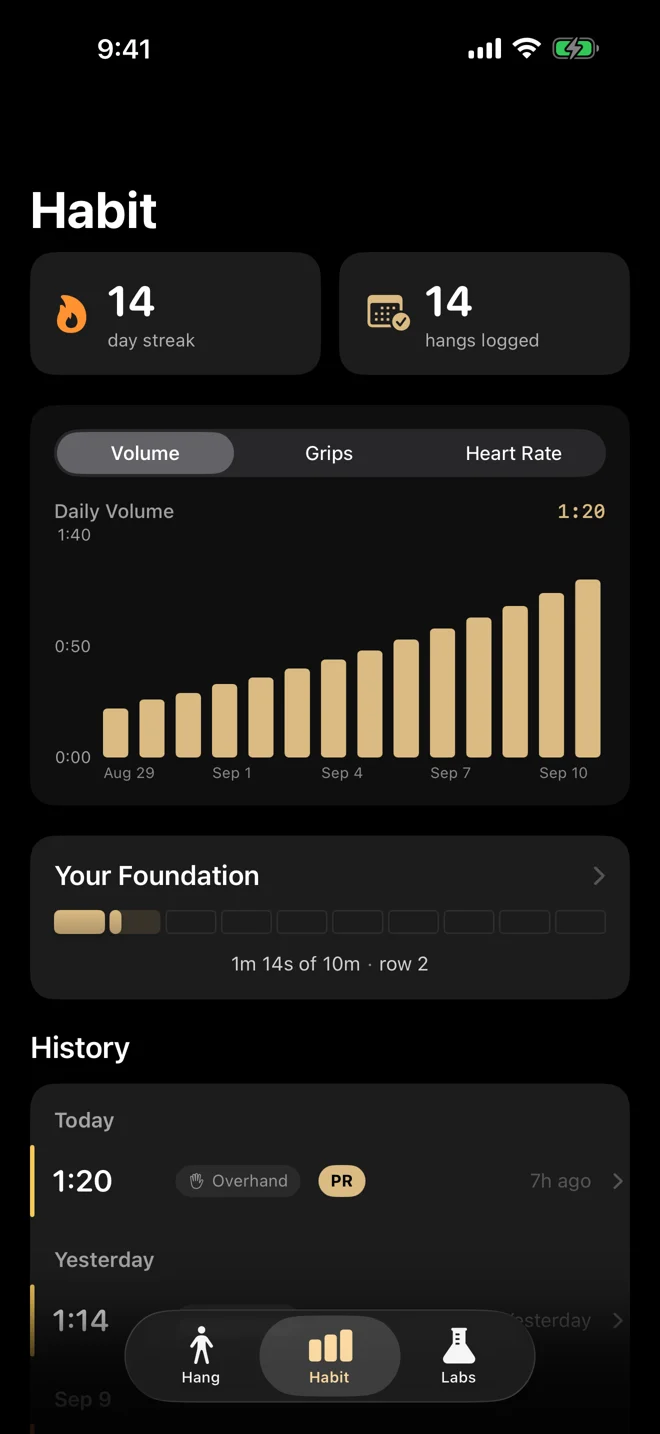
BUILD SOMETHING REPEATABLE
The next hang
matters more
than the perfect streak.
A familiar cue. A manageable effort. A record of showing up. Start with a routine that fits your day, and adjust it as you learn.
Build your hanging habit →- 01
Choose your moment.
Pair practice with something you already do, like arriving at the gym.
- 02
Make it manageable.
Use a suitable, securely installed bar. Choose an effort you can control; a personal best is optional.
- 03
Keep coming back.
Review your history over time. Missed a day? Rest when you need it, then resume without making up a debt.
THE HANG HABIT PLAYLIST
Where movement
meets music.
Your bar. Your moment. A soundtrack to come back to.
Put on the Hang Habit playlist and make this time yours.
BEFORE YOU GRAB THE BAR
A few useful answers.
What is Hang Habit?
Hang Habit is a dead hang timer and habit tracker for iPhone and Apple Watch. Track time, review your saved hangs and work toward your own goals. No account is required.
Do I need an Apple Watch?
No. The iPhone manual timer lets you start, stop and save a hang yourself. Apple Watch adds motion-based timing after you tap to arm it.
What is new in the second release?
Version 2.1 adds compatible AirPods timing and spoken coaching, a simpler Watch flow, and more ways to review your progress.
Do all AirPods support head gestures?
No. Head-gesture timing requires compatible AirPods and device support. The app checks support and offers the manual timer when gestures are unavailable. You tap to arm before using a nod to start or a shake to end.
Does every hang save to Apple Health?
No. With permission, supported Watch and AirPods workout paths can save workouts to Apple Health. Manual iPhone timing saves Hang Habit history locally and does not create a Health workout.
Is Hang Habit free?
The app is free to download, with no account required. You can also use the free browser timer without an iPhone. Check the App Store listing for the currently available version and device requirements.
What data does Hang Habit share?
Your hang history is saved on your devices. Starting in version 2.1 build 83, two optional analytics choices are off by default, including after an upgrade. Version 1.5 uses automatic analytics. Feedback is sent when you choose to send it. The privacy policy explains providers, retention and separate website analytics.
Can I use the website timer with my app history?
The browser timer is a separate tool. Its history stays in that browser and does not sync with the iPhone app or Apple Health. Clearing browser storage can remove it.
YOUR NEXT HANG STARTS HERE
Make time to hang.
iPhone and Apple Watch · No account required
MAKE ROOM FOR YOUR NEXT HANG
Need a bar?
Hang Habit is free. Looking for a bar? Compare options for your space, with guidance on fit, mounting, and room to hang.
Find a bar for your space →The guide includes Amazon affiliate links. As an Amazon Associate, we earn from qualifying purchases.
A GOOD PLACE TO BEGIN
Understand the practice.
How to do a dead hang
Equipment, a controlled setup and ways to approach your first practice.
UNDERSTAND THE EVIDENCEGrip strength & health
What research can tell us—and what a hang timer cannot.
MAKE IT YOURSA flexible practice plan
A framework to adapt, without a promised result or a perfect streak.